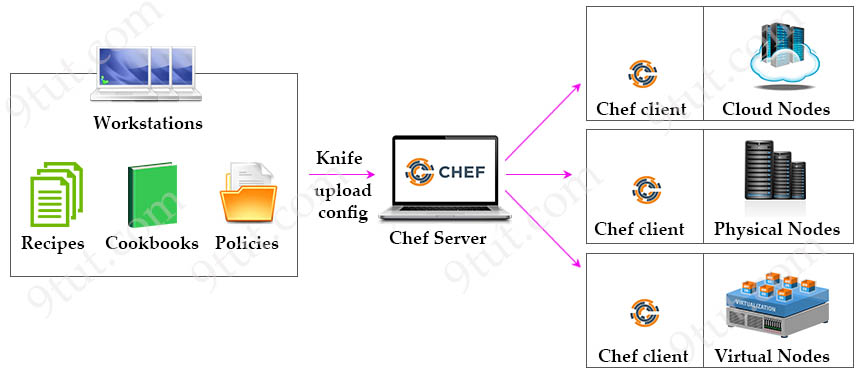
Chef is an automation platform that configures and manages your network infrastructure. Chef transforms infrastructure into code. “Infrastructure into code” here means “deploy your code/application/configuration and policy” on many machines or instances automatically via your code.
As shown in the diagram below, there are three major Chef components:
READ MORE…
There are several automation tools available to make configuration management easier: Ansible, Chef, Puppet… The goal of these tools is to reduce the complexity and time to configure and maintain networks (especially big ones with hundreds of devices). In this tutorial we will learn some basic knowledge of Ansible in the scope of CCNA level.
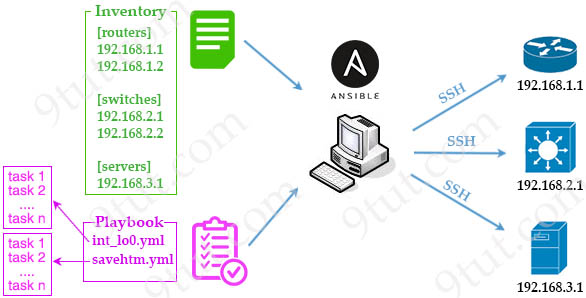
Ansible uses an agentless architecture to manage network devices. Agentless means that the managed device does not need any code (agent) to be installed on it. Therefore Ansible uses SSH (NETCONF over SSH in particular) to “push” changes and extract information to managed devices.
Once Ansible is installed, it creates several text files:
+ Playbooks: These files provide actions and logic about what Ansible should do. Ansible playbooks are files that contain tasks to configure hosts. Ansible playbooks are written in YAML format. Inside Playbooks, we have:
++ Modules (also referred to as “task plugins” or “library plugins”) are discrete units of code that can be used from the command line or in a playbook task. Ansible executes each module, usually on the remote managed node, and collects return values.
++ Tasks: Tasks are Ansible’s smallest unit of work. They are a series of actions on the target hosts, using modules to provide functionalities.
A task defines an action that needs to be performed, while a module executes the action on a managed host.
+ Inventory: a file contains a list of the hosts (usually their IP addresses, ports) which you want to configure or manage. Hosts in an inventory can be divided into smaller groups for easier management and configuration. Each group can run different tasks. An example of a task is to ping all hosts in group [routers].
+ Templates: Using Jinja2 language, the templates represent a device’s configuration but with variables.
+ Variables: Using YAML, a file can list variables that Ansible will substitute into templates.
READ MORE…
JavaScript Object Notation (JSON) is a human readable and very popular format used by web services, programming languages (including Python) and APIs to read/write data. JSON is also a subject of the CCNA 200-301 so in this article we will learn some basic knowledge of JSON and how to use Python to process JSON.
JSON syntax structure:
+ uses curly braces {} to hold objects and square brackets [] to hold arrays
+ JSON data is written as key/value pairs
+ A key/value pair consists of a key (must be a string in double quotation marks ""), followed by a colon :, followed by a value. For example: “name”:”John”
+ Each key must be unique
+ Values must be of type string, number, object, array, boolean or null
+ Multiple key/value within an object are separated by commas ,
READ MORE…
In this tutorial, we will learn about Layer 2 threats include DHCP Spoofing, VLAN Hopping and ARP Attack and how to use security features (DHCP snooping, VACL, Dynamic ARP Inspection) to mitigate them.
1. DHCP Spoofing:
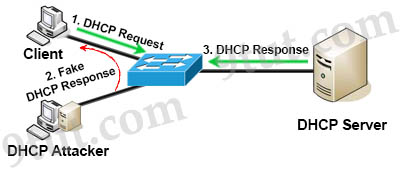
DHCP spoofing is a type of attack in that the attacker listens for DHCP Requests from clients and answers them with fake DHCP Response before the authorized DHCP Response comes to the clients. The fake DHCP Response often gives its IP address as the client default gateway -> all the traffic sent from the client will go through the attacker computer, the attacker becomes a “man-in-the-middle”.
READ MORE…


